GMIC AI LUMEN HA-MIC07

Shows who you are.
Remembers the day.

Lumen is a smart badge with a color e-paper screen, worn on the chest. The screen shows a name, a role and a QR code. The microphones record conversations, and the cloud turns them into text, summaries and a daily report. Screen content, working modes and back-end integration can all be tailored to your use case.

Customization & samplesSee use cases

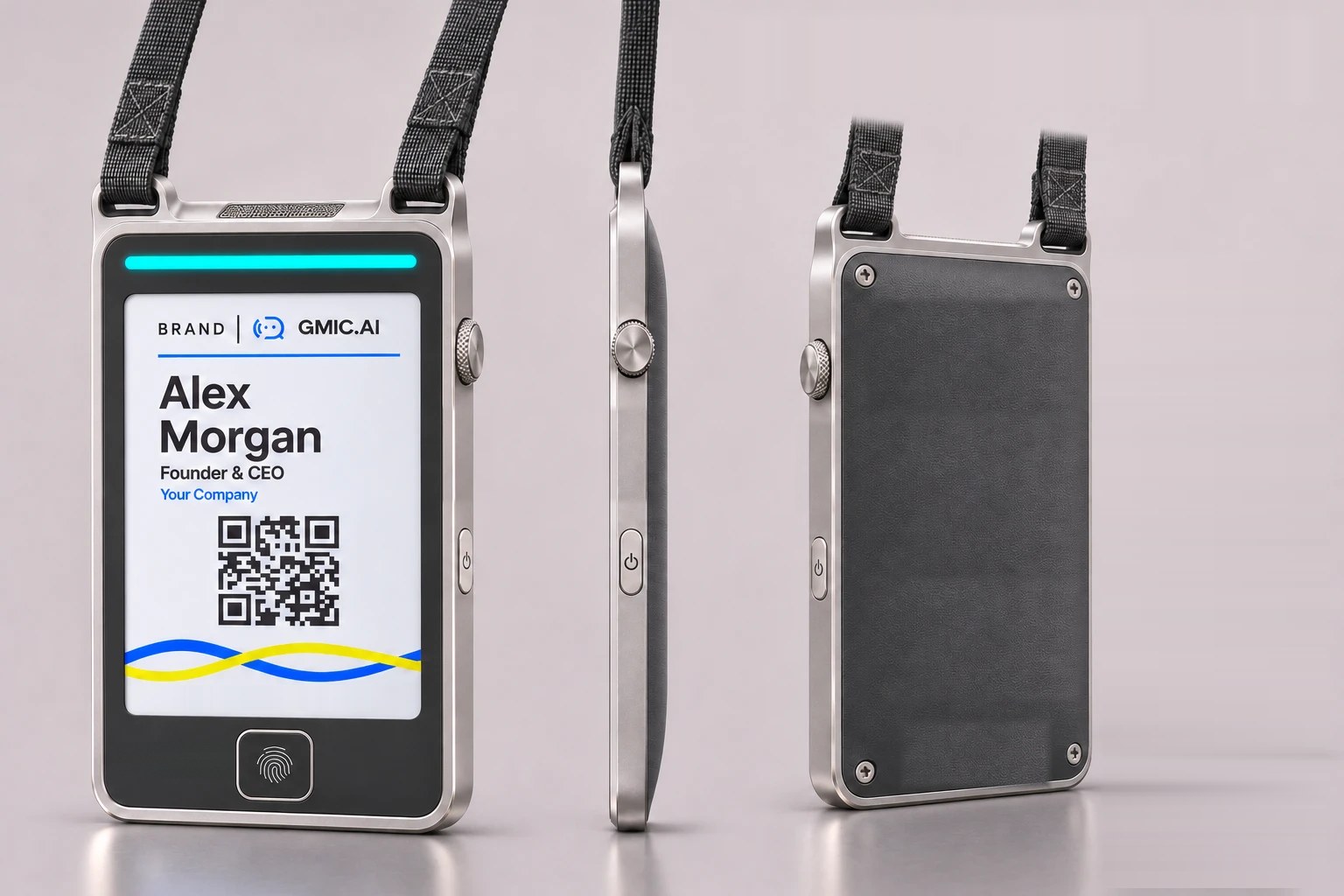
Lumen exterior render: the front has a color e-paper screen and a fingerprint sensor, the side has a crown and a power button, the back is a textured panel, and two lugs on top hold a woven strap
Exterior render: front, side and back
Six-color e-paper
3.7inch
Thickness
8–9mm
Design weight
~80g
On-device audio storage
60+hours
Battery design target per charge, at about 10 hours of use per day
~1week

One badge, three jobs

Display

A color screen that reads well in bright light

A 3.7-inch six-color e-paper screen shows text, images and QR codes. The image stays on with no power and remains readable outdoors and under exhibition lighting.

  • Content can be updated remotely
  • The image stays on the screen after power-off
  • Layouts can follow your brand
Record

Conversations become text, summaries and daily reports

Multiple microphones pick up the conversation. Press the crown once to start or stop, or set hours for automatic recording. Audio uploads when a network is available and is stored on the device when it is not.

  • Cloud transcription, summaries and a daily report
  • Mark key moments with one press while recording
  • Stores more than 60 hours of audio on the device
Verify & connect

Knows who is wearing it, connects with a tap

Fingerprints are enrolled and matched on the device to confirm the wearer. Someone taps the badge with a phone, or scans the QR code on the screen, and a page you choose opens.

  • NFC can be read even when the device is off
  • Dual-band Wi-Fi and Bluetooth, set up from a phone web page
  • Remote device status and remote firmware updates

Use cases

The same hardware, with different screen content and working modes, fits many roles. Here are six typical ones.

Trade shows & events

Exhibitors, sales teams, founders, event staff

On screen
Name, company, title, booth number and a QR code.
How it's used
You meet dozens of people in a day and the badge keeps the conversations. Mark the important ones with one press. A tap or a scan gives the other person your page and contact details.
What you get
A summary of the day: who you met, what was discussed and what to follow up.
Sales & client visits

Sales reps, account managers, consultants

On screen
Name, title, company and a contact QR code.
How it's used
Wear it during the visit and the notes are ready when the conversation ends. Marked moments are listed separately, so agreed items are easy to confirm.
What you get
Visit notes and a follow-up list. They can flow into your customer system through an interface (provided per project).

Retail & service desks

Store associates, front desk, customer service

On screen
Name, role, languages spoken, and a membership or campaign QR code.
How it's used
Head office updates the screens centrally, so a new campaign needs no reprinted badges. The wearer decides whether a service conversation is recorded. Recordings can be used for training and review.
What you get
A summary of service highlights. Customers scan or tap to reach the page you choose.

Field service & inspection

Field engineers, maintenance, property management, inspectors

On screen
Name, staff ID, service provider and a verification QR code.
How it's used
With both hands busy, speaking is the record. The customer scans or taps to open a page you choose, such as a staff verification page or a service rating page.
What you get
A work log organized by day.

Shift teams

Booths, stores and field teams where several people take turns

On screen
The current wearer's name and shift.
How it's used
Several people share one badge. The next person presses the fingerprint sensor, the screen switches to their content, and recordings from then on belong to them.
What you get
Separate records and summaries for each person.
Extension capability: hardware is ready, enabled per project

Daily office work & meetings

Managers, project leads, roles with a lot of conversations

On screen
Name, team and today's status.
How it's used
Set working hours. The badge sleeps outside them and wakes on schedule. Walk-around conversations and ad-hoc meetings can leave notes behind.
What you get
A daily report.

It can fit more roles

Screens shown are illustrations. Names and content are examples.

  • Event hospitality
  • Training & coaching
  • Visitor guidance
  • On-site consultants
  • Sports events & volunteer teams
  • Community home services
  • Interviews & research

Any role that needs to show identity and has conversations worth keeping can be configured for Lumen.

A day with Lumen

  1. Put it on

    Take it off the charging cable and hang it on your chest. The screen shows your name, role and QR code.

  2. Start recording

    Press the crown once to start and again to stop. Or set it to record automatically during working hours.

  3. Mark key moments

    Mark the moment when something important comes up. It is listed separately in the summary.

  4. Exchange details

    The other person taps the badge with a phone, or scans the QR code, to open the page you choose.

  5. Wrap up

    Audio uploads when a network is available. The cloud prepares text, a summary and a daily report. Charge over USB-C.

Visible recording

Recording, out in the open

Lumen is worn on the chest with the screen facing out. The wearer and the person in front of them can both see whether it is recording.

  • The wearer holds the switchPress the crown once to start and again to stop.
  • A light shows when it recordsThe status light bar indicates recording, and people nearby can see it.
  • Sleeps outside working hoursSet working hours. Nothing is recorded outside them.
  • Confirms the wearerFingerprints are enrolled and matched on the device.
  • Signed updatesFirmware carries a dual signature. The customer can hold their own signing key.
  • Compliant useUse the recording function in line with local laws and regulations.

Can be tailored to your use case

Lumen can run with the standard configuration or be tailored layer by layer, from screen content to back-end integration. The hardware also has extension capacity reserved, which can be enabled on request.

Try a different screen

Layout
Accent

The screen shown is an illustration. Actual layouts are designed per project, using the screen's six colors.

Screen & brand

Looks like your product

  • Screen layout
  • Displayed content
  • Boot logo
  • Alert sounds

Controls & working modes

Fits how the role works

  • Button functions
  • Light bar effects
  • Working hours
  • Recording modes

Data & back end

You decide where the data goes

  • Standard service Use GMIC AI cloud storage, transcription, summaries and the management console directly.
  • Data integration Audio, text and summaries reach your systems through an interface (provided per project).
  • Your own back end Upload addresses and management channels point to your own storage and services.
  • Your own signing key You hold the update signing key. Firmware you have not signed cannot be installed.

Hardware extensions

Built in or reserved, enabled on request

  • Multi-user rotationSwitch displayed content and record ownership by fingerprint
  • Low-power always-on listeningListens for voice or a wake word during sleep
  • More microphonesUp to 6, for localization and noise reduction
  • External wireless microphoneReceiver position reserved
  • Voice assistantPress and hold the crown to speak
  • Audio encryptionWorks with the on-board secure chip
  • TouchInterface reserved
  • Extra buttonFunction can be customized

Design & parts

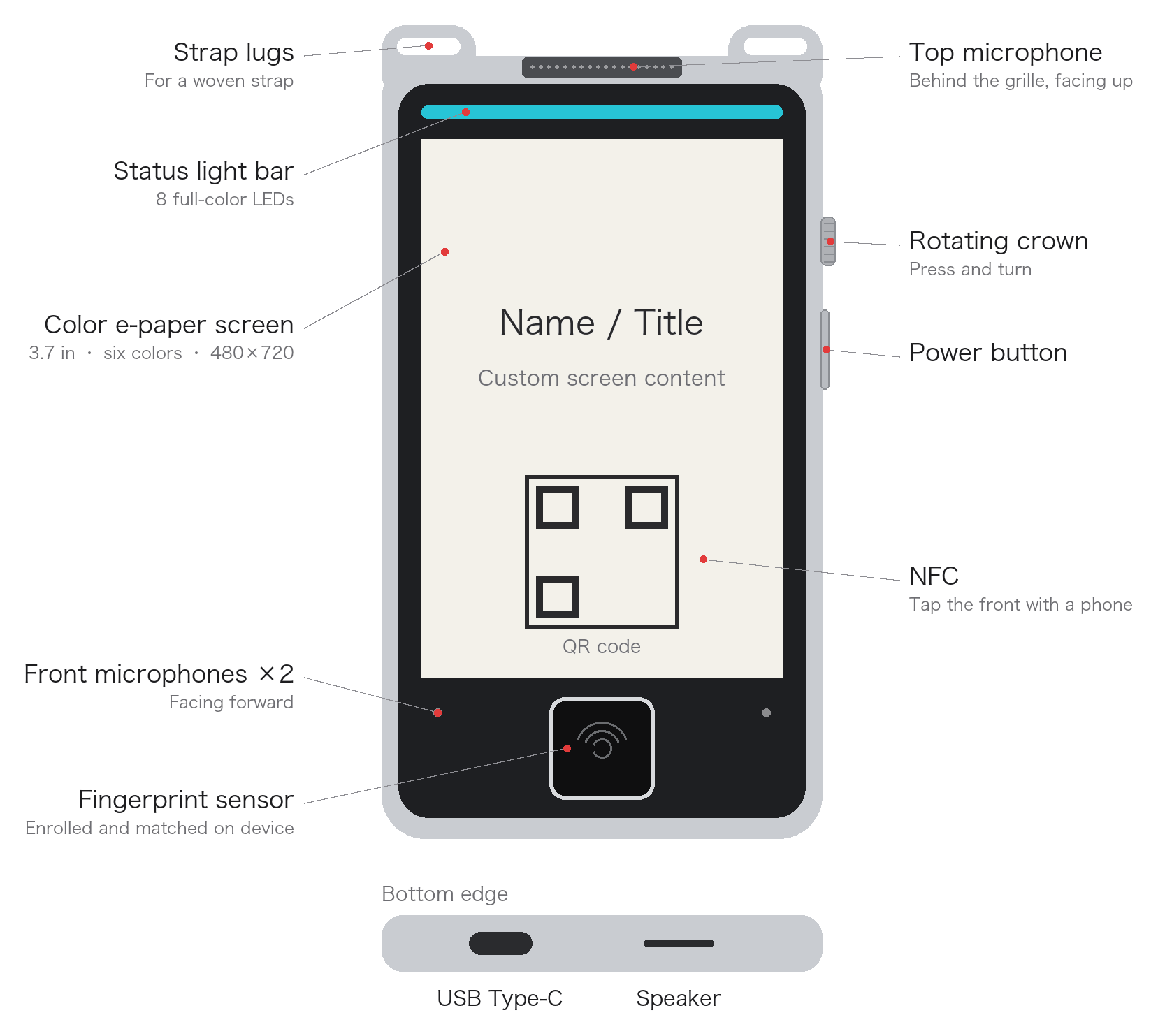
Metal frame, black front panel, textured back. Two lugs on top take a soft woven strap. Wear it on a lanyard, hold it in hand or lay it flat.

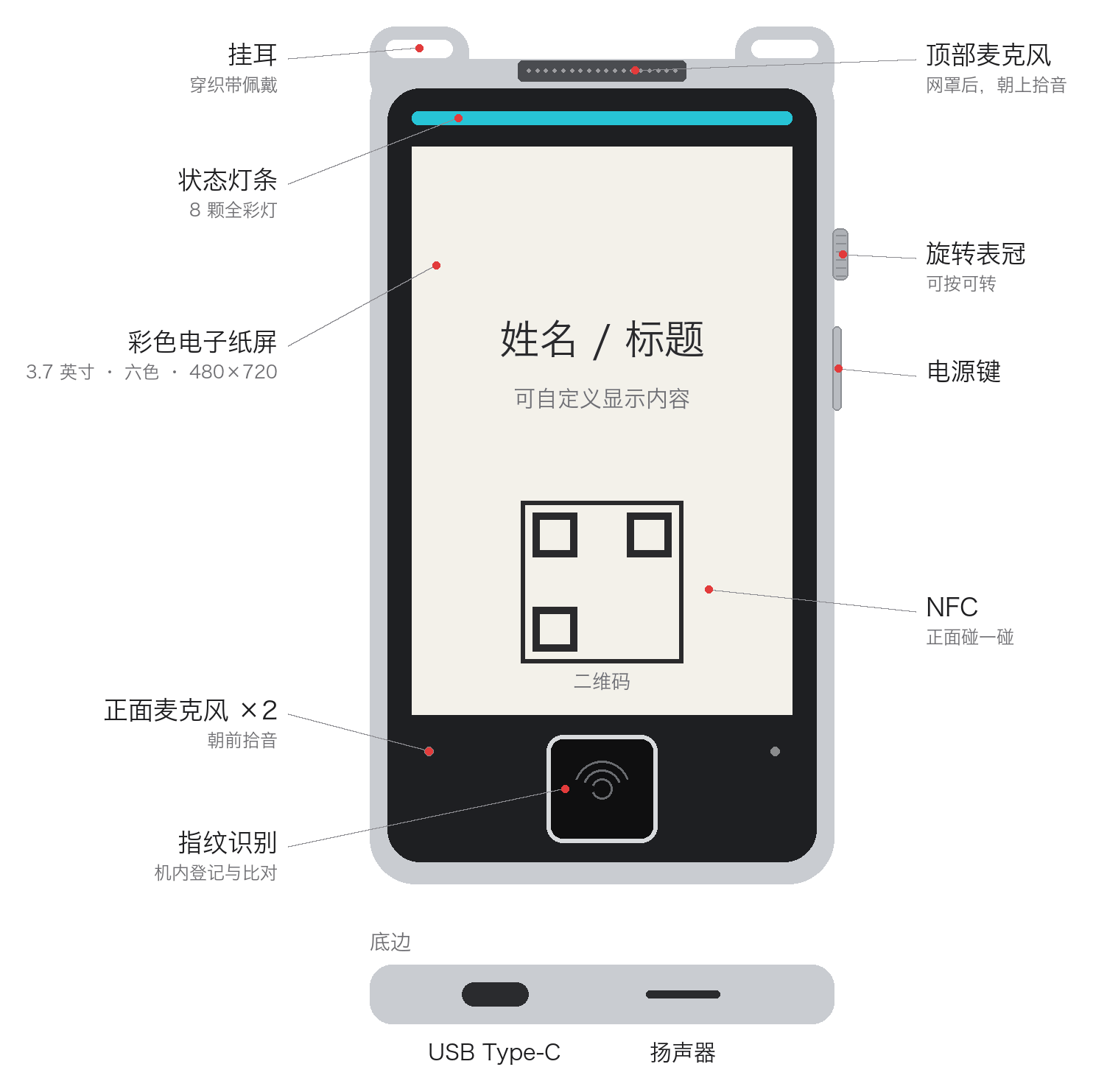
Parts diagram: strap lugs, top microphone, status light bar, color e-paper screen, rotating crown, power button, NFC, two front microphones and fingerprint sensor, with USB Type-C and a speaker on the bottom edge
Parts diagram. Front: strap lugs, top microphone, status light bar, color e-paper screen, rotating crown, power button, NFC, two front microphones, fingerprint sensor. Bottom edge: USB Type-C, speaker.
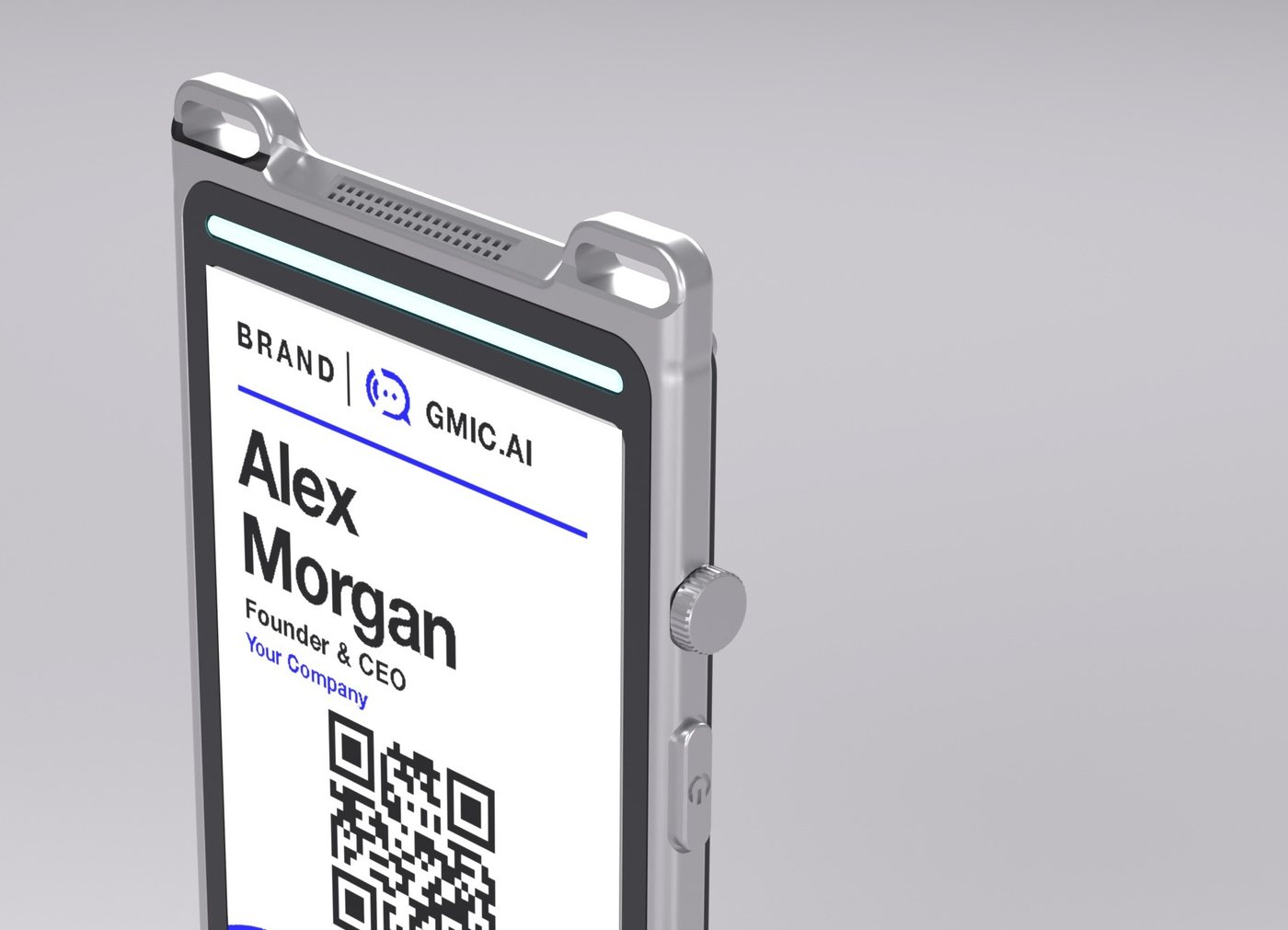
Detail render of the top
Top: lugs, microphone grille, status light bar, crown and power button
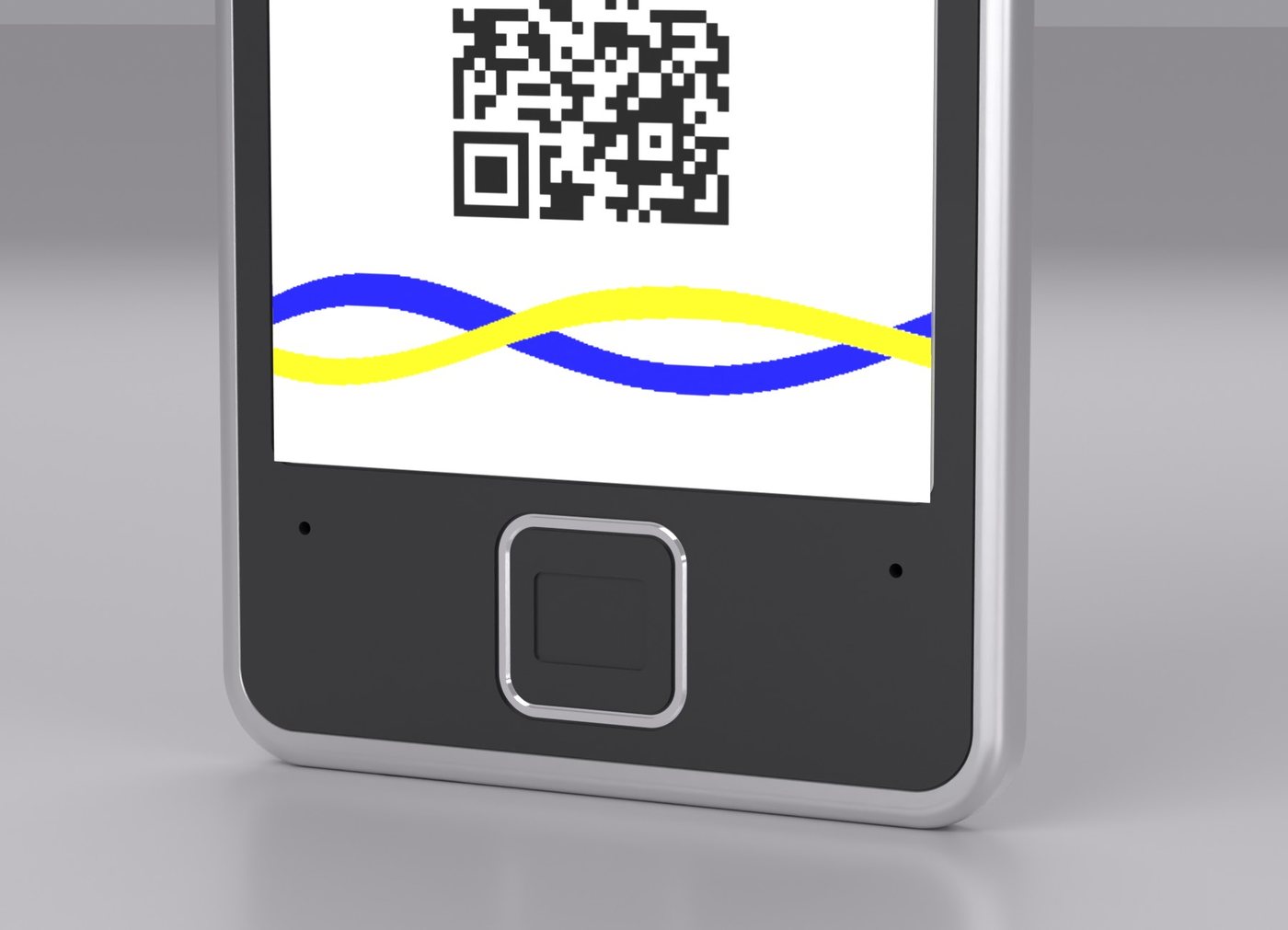
Detail render of the lower front
Lower front: fingerprint sensor and two front microphones

Key specifications

Screen
3.7-inch color e-paper, six colors, 480 × 720
Size
Approx. 63 × 112 mm, approx. 8–9 mm thick
Weight
Approx. 80 g (design value)
Microphones
3 digital microphones, expandable to 6
Storage
Approx. 60+ hours of audio on the device
Wireless
Wi-Fi 2.4 GHz / 5 GHz, Bluetooth
Near field
NFC, readable by phones, also when the device is off
Fingerprint
Capacitive, enrolled and matched on the device
Controls
Rotating crown (press and turn), power button, 8 full-color status LEDs
Battery
Approx. 1100 mAh (design value), USB Type-C charging

A full specification sheet is available on request.

Tell us about your use case

Tell us who will wear it, what the screen should show and where the records should go. We will suggest a configuration for your use case.

Contact GMIC AI

gmic.ai

GMIC AI Lumen (model HA-MIC07) Specifications and functions on this page are current design values and are subject to the final product. Product images are renders. Screens shown are illustrations.